Thursday, December 13, 2012

FW: SP1 of Vault 2013 and SP2 of Vault 2012 released

« Error 155 Illegal Null Parameter during Assign Item in Vault Pro 2013 | Main

December 13, 2012

SP1 of Vault 2013 and SP2 of Vault 2012 released

I am happy to announce that the SP1 for Vault 2013 and SP2 of Vault 2012 is now released!

Highlight besides many fixes is the reintroducing of Purge.

Please read the instructions in the readme carefully about Purge.

In the readme there is for example mentioned how to enable Purge and how to manually repairing references

Downloads:

Vault 2013 SP1                   Readme Vault 2013 SP1

Vault 2012 SP2                   Readme Vault 2012 SP2

TrackBack

Comments

Verify your Comment

Previewing your Comment

Posted by:  | 

This is only a preview. Your comment has not yet been posted.

Your comment could not be posted. Error type:
Your comment has been posted. Post another comment

The letters and numbers you entered did not match the image. Please try again.

As a final step before posting your comment, enter the letters and numbers you see in the image below. This prevents automated programs from posting comments.

Having trouble reading this image? View an alternate.

#Vault users, your service packs have been released! 2013-SP1 & 2012-SP2

Tuesday, December 11, 2012

Reading: PLM Cloud Concerns and Dropbox Reality for Engineers

Last week at AU, I attended Innovation Forum – The Reality of the cloud. The presentation made by Theresa Payton of Fortalice LLC caught my special attention. It was about security. Check later here. Security is loaded and complicated topic. Physical security is one of the top 5 concerns of customers related to the decision of using cloud services. Even if consumption of online services is growing crazy, companies are very careful in placing their missing critical data assets to the cloud. Especially when it comes to IP (intellectual property). Navigate here to read what SearchCIO blog is saying about that. You need to register to read full article. The following passage is interesting:

To be sure, some cloud services are pretty lightweight, such as filling out a form to schedule an online meeting. But for mission-critical applications or storing data in the cloud, you need to ask tough questions: “What does their data center look like? Are they willing to show you a diagram? Backup plans? Security documents?” asked Jessica Carroll, managing director of IT for the United States Golf Association, which uses the cloud for business continuity, as well as for collaboration with 1,500 golfing associations nationwide.

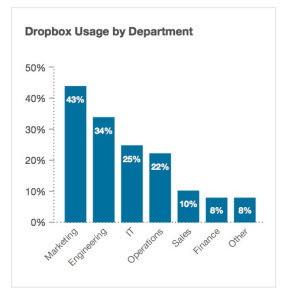
Contact any CIO in the industry and his team will drain you down with the endless list of questions about security. However, here is a news for you, Mr. CIO. I don’t know if you are aware, but 34% of your engineering staff is placing data on the cloud in their Dropbox accounts. What is more surprising – half of them are aware they are doing it against the company rules. Navigate to the following link to read more and see some diagrams – Guess what Mr. CIO? One in five of your employees uses Dropbox at work.

One out of five of 1,300 business users surveyed said they use the consumer file-sync-and-share system with work documents, according to new research by Nasuni, an enterprise storage management company. And, half of those Dropbox users do this even though they know it’s against the rules.

However, the fact employees are putting files in the Dropbox is just half of the problem. Since they are using private accounts, the information remains there even after an employee is leaving the company.

“The sensitive data stored in Dropbox is not secure and just as importantly, not controlled by IT. This means that if an employee leaves the company, the information that [a] user has stored goes with them, creating a significant risk of data loss or exposure. Furthermore, as the amount of sensitive corporate data stored in Dropbox increases, the online file-sharing service will become a more attractive target for hackers and other malicious groups.

What is my conclusion? Think about PLM and Excel. Who won the game? I think the answer is clear – Excel. Each time, PDM/PLM software was incompetent to provide a reliable solution, Microsoft Excel won PLM competition. Now, guess what? If company and corporate IT continue to abuse users’ demand to have flexible and easy access to information, the information flow will go from proprietary data and file servers directly to Dropbox and similar “easy to use” cloud services. Companies need to pay attention. Just my thoughts…

Best, Oleg

Share

Tagged as: Cloud, Dropbox, Engineering, Enterprise, Stats

Does your IT department have control of the IP? The graph in this post by #OlegShilovitsky hints towards "no". Employees are deliberatly bypassing rules by using their personal dropbox/drive/skydrive/box accounts to be able to work more flexibel or continue an important task at home.
Being aware it happens is step 1, step 2 is controlling and/or providing a suitable alternative.

Monday, December 10, 2012

FW: #Vault 2013 pro bugfix for: Error 155 Illegal Null Parameter during Assign Item

« The database principal owns a database role and cannot be dropped | Main

December 07, 2012

Error 155 Illegal Null Parameter during Assign Item in Vault Pro 2013

In Vault Pro 2012 we also had the issue with the error 155 during assign item and the solution was mentioned in this article Error 155 When Trying To Assign Item on Vault Pro 2012.

However if you have this error "Error 155 Illegal Null Parameter" in Vault Pro 2013 the solution mentioned here (checkout file, rebuild all in Inventor, check back in) usually doesn´t help.

You will need to reinstall the Vault Server 2013.

Before this you should be sure that you have a valid backup of your Vault.

Steps to reinstall the Vault Server:

1. Go to Control Panel

2. Go to Programs and Features

3. Go to Autodesk Vault Professional 2013 (Server) and choose "Uninstall/Change"

4. On the Setup Pick "Repair or Reinstall"

5. Select Reinstall and start the operation

If this was successful the issue with error 155 should be resolved.

Comments

Verify your Comment

Previewing your Comment

Posted by:  | 

This is only a preview. Your comment has not yet been posted.

Your comment could not be posted. Error type:
Your comment has been posted. Post another comment

The letters and numbers you entered did not match the image. Please try again.

As a final step before posting your comment, enter the letters and numbers you see in the image below. This prevents automated programs from posting comments.

Having trouble reading this image? View an alternate.

Involves backup and repair/reinstall, which could take a while, but will remove the error.

Wednesday, December 5, 2012

Want to speed up the resolve time for #Autodesk #Vault support? The do's & don'ts

Although my official job title is “Software Engineer,” my API knowledge makes me an honorary member of the tech support team.  More often than not, I read a problem and don’t have enough information to answer it properly.  This requires me to respond asking for more formation.  Usually one or two more back-and-forth sessions are needed before the question is finally answered.  This process is a wasteful, especially when different time zones are involved.  If you figure that each back-and-forth takes 24 hours, there is a definite benefit to reducing these round-trips.

So here is a list of things you can do to make the process more efficient.  The goal is to provide all the needed information upfront so that I don’t have to go back and ask you to elaborate in more detail.

DO... include the Vault product and version
Is it Vault Basic?  Vault Professional?  Is is the 2013 version?  Each product has a different feature set and the API may change between release years.

DON’T... use the phrase “It doesn’t work”
That statement is way to vague.  You need to be more specific like “it crashes the program” or “it locks up and I have to restart the app” or “it times out” or “it returns error 303”

DO... include the error code
If the server returns an error, don’t just say “the server throws an error”.  Tell me what the error code is.  Don’t leave me in suspense.  I even have some code snippets you can use to extract the error and restriction codes (if any).

DON’T... provide too much source code
Sometimes people will post their entire project and expect me to debug it.  That’s not a good use of anybody’s time.  If you are going to include source code, it should be isolated to a single function at most.

DO... isolate the line of code that fails
If you are sending a block of code and are getting Exceptions, you need to indicate clearly which line is causing the breakage.

DO... take screenshots
It’s amazing how much information is conveyed in a screenshot.  Even if the Vault is in a different language, I can usually figure out what is going on based on the icons and dialogs.  Videos are great too.  If you find yourself taking 4 or more screenshots, it may be easier to just record a video.

DO... use Exception.ToString()
ToString is the best thing to happen to debugging since the print statement.  Don’t be afraid to use it and include the full stack trace in your problem report.  Even if you don’t understand it all, it may make sense to me since I have access to the Vault source code.

Having to call the helpdesk almost always means the problem is severe, so time is a relevant issue. Help the helpdesk help you better by following these do's & don'ts to speed up their resolve time.
Win-win for a happy helpdesk and a speady resolved costumer.

Misconceptions on extraverts vs introverts: check out this new webseries (#FlowGeneration)

TED Blog

Main

04 December 2012

Introverts, (gently) rejoice! We found a web series just for you

You may remember Susan Cain’s revolutionary talk from TED2012, on the quiet, unseen power of introverts. Careful to acknowledge that many of us hold both extroverted and introverted traits, she points out that many of our most publically treasured figures have introverted tendencies — yet we still “favor the man of action over the man of contemplation.” Cain’s book, Quiet: The Power of Introverts in a World That Can’t Stop Talking, delves further into why this discrimination occurs.

We stumbled upon this brand new web series based on Quiet, created and narrated by Daniel Widfeldt Lomas and animated by Petri Ltajif. In this delightfully illustrated first episode, Lomas lays out the adjectives associated with introversion: lazy, slow and boring. But to think of introverts in a disparaging way doesn’t give credit to the many gifts they may hold: their ability to work deliberately, their strong concentration and their love of contemplation. Echoing Cain’s work, Lomas shares the many complex personalities that our introvert-or-extrovert model fails to encompass.

Subscribe to the series’ YouTube channel to be updated when they release their next episode.

Share this:

Bookmark and Share

Posted by Shirin Samimi-Moore | Permalink | Comment | Trackback

From TED.com; video here: http://www.youtube.com/watch?feature=player_embedded&v=Ar1kEN_ZPNM
This opened up alot of questions and wondering on wether or not previous mental labels are actually correct.