Thursday, December 13, 2012

FW: SP1 of Vault 2013 and SP2 of Vault 2012 released

« Error 155 Illegal Null Parameter during Assign Item in Vault Pro 2013 | Main

December 13, 2012

SP1 of Vault 2013 and SP2 of Vault 2012 released

I am happy to announce that the SP1 for Vault 2013 and SP2 of Vault 2012 is now released!

Highlight besides many fixes is the reintroducing of Purge.

Please read the instructions in the readme carefully about Purge.

In the readme there is for example mentioned how to enable Purge and how to manually repairing references

Downloads:

Vault 2013 SP1                   Readme Vault 2013 SP1

Vault 2012 SP2                   Readme Vault 2012 SP2

TrackBack

Comments

Verify your Comment

Previewing your Comment

Posted by:  | 

This is only a preview. Your comment has not yet been posted.

Your comment could not be posted. Error type:
Your comment has been posted. Post another comment

The letters and numbers you entered did not match the image. Please try again.

As a final step before posting your comment, enter the letters and numbers you see in the image below. This prevents automated programs from posting comments.

Having trouble reading this image? View an alternate.

#Vault users, your service packs have been released! 2013-SP1 & 2012-SP2

Tuesday, December 11, 2012

Reading: PLM Cloud Concerns and Dropbox Reality for Engineers

Last week at AU, I attended Innovation Forum – The Reality of the cloud. The presentation made by Theresa Payton of Fortalice LLC caught my special attention. It was about security. Check later here. Security is loaded and complicated topic. Physical security is one of the top 5 concerns of customers related to the decision of using cloud services. Even if consumption of online services is growing crazy, companies are very careful in placing their missing critical data assets to the cloud. Especially when it comes to IP (intellectual property). Navigate here to read what SearchCIO blog is saying about that. You need to register to read full article. The following passage is interesting:

To be sure, some cloud services are pretty lightweight, such as filling out a form to schedule an online meeting. But for mission-critical applications or storing data in the cloud, you need to ask tough questions: “What does their data center look like? Are they willing to show you a diagram? Backup plans? Security documents?” asked Jessica Carroll, managing director of IT for the United States Golf Association, which uses the cloud for business continuity, as well as for collaboration with 1,500 golfing associations nationwide.

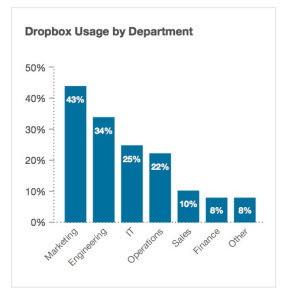
Contact any CIO in the industry and his team will drain you down with the endless list of questions about security. However, here is a news for you, Mr. CIO. I don’t know if you are aware, but 34% of your engineering staff is placing data on the cloud in their Dropbox accounts. What is more surprising – half of them are aware they are doing it against the company rules. Navigate to the following link to read more and see some diagrams – Guess what Mr. CIO? One in five of your employees uses Dropbox at work.

One out of five of 1,300 business users surveyed said they use the consumer file-sync-and-share system with work documents, according to new research by Nasuni, an enterprise storage management company. And, half of those Dropbox users do this even though they know it’s against the rules.

However, the fact employees are putting files in the Dropbox is just half of the problem. Since they are using private accounts, the information remains there even after an employee is leaving the company.

“The sensitive data stored in Dropbox is not secure and just as importantly, not controlled by IT. This means that if an employee leaves the company, the information that [a] user has stored goes with them, creating a significant risk of data loss or exposure. Furthermore, as the amount of sensitive corporate data stored in Dropbox increases, the online file-sharing service will become a more attractive target for hackers and other malicious groups.

What is my conclusion? Think about PLM and Excel. Who won the game? I think the answer is clear – Excel. Each time, PDM/PLM software was incompetent to provide a reliable solution, Microsoft Excel won PLM competition. Now, guess what? If company and corporate IT continue to abuse users’ demand to have flexible and easy access to information, the information flow will go from proprietary data and file servers directly to Dropbox and similar “easy to use” cloud services. Companies need to pay attention. Just my thoughts…

Best, Oleg

Share

Tagged as: Cloud, Dropbox, Engineering, Enterprise, Stats

Does your IT department have control of the IP? The graph in this post by #OlegShilovitsky hints towards "no". Employees are deliberatly bypassing rules by using their personal dropbox/drive/skydrive/box accounts to be able to work more flexibel or continue an important task at home.
Being aware it happens is step 1, step 2 is controlling and/or providing a suitable alternative.

Monday, December 10, 2012

FW: #Vault 2013 pro bugfix for: Error 155 Illegal Null Parameter during Assign Item

« The database principal owns a database role and cannot be dropped | Main

December 07, 2012

Error 155 Illegal Null Parameter during Assign Item in Vault Pro 2013

In Vault Pro 2012 we also had the issue with the error 155 during assign item and the solution was mentioned in this article Error 155 When Trying To Assign Item on Vault Pro 2012.

However if you have this error "Error 155 Illegal Null Parameter" in Vault Pro 2013 the solution mentioned here (checkout file, rebuild all in Inventor, check back in) usually doesn´t help.

You will need to reinstall the Vault Server 2013.

Before this you should be sure that you have a valid backup of your Vault.

Steps to reinstall the Vault Server:

1. Go to Control Panel

2. Go to Programs and Features

3. Go to Autodesk Vault Professional 2013 (Server) and choose "Uninstall/Change"

4. On the Setup Pick "Repair or Reinstall"

5. Select Reinstall and start the operation

If this was successful the issue with error 155 should be resolved.

Comments

Verify your Comment

Previewing your Comment

Posted by:  | 

This is only a preview. Your comment has not yet been posted.

Your comment could not be posted. Error type:
Your comment has been posted. Post another comment

The letters and numbers you entered did not match the image. Please try again.

As a final step before posting your comment, enter the letters and numbers you see in the image below. This prevents automated programs from posting comments.

Having trouble reading this image? View an alternate.

Involves backup and repair/reinstall, which could take a while, but will remove the error.

Wednesday, December 5, 2012

Want to speed up the resolve time for #Autodesk #Vault support? The do's & don'ts

Although my official job title is “Software Engineer,” my API knowledge makes me an honorary member of the tech support team.  More often than not, I read a problem and don’t have enough information to answer it properly.  This requires me to respond asking for more formation.  Usually one or two more back-and-forth sessions are needed before the question is finally answered.  This process is a wasteful, especially when different time zones are involved.  If you figure that each back-and-forth takes 24 hours, there is a definite benefit to reducing these round-trips.

So here is a list of things you can do to make the process more efficient.  The goal is to provide all the needed information upfront so that I don’t have to go back and ask you to elaborate in more detail.

DO... include the Vault product and version
Is it Vault Basic?  Vault Professional?  Is is the 2013 version?  Each product has a different feature set and the API may change between release years.

DON’T... use the phrase “It doesn’t work”
That statement is way to vague.  You need to be more specific like “it crashes the program” or “it locks up and I have to restart the app” or “it times out” or “it returns error 303”

DO... include the error code
If the server returns an error, don’t just say “the server throws an error”.  Tell me what the error code is.  Don’t leave me in suspense.  I even have some code snippets you can use to extract the error and restriction codes (if any).

DON’T... provide too much source code
Sometimes people will post their entire project and expect me to debug it.  That’s not a good use of anybody’s time.  If you are going to include source code, it should be isolated to a single function at most.

DO... isolate the line of code that fails
If you are sending a block of code and are getting Exceptions, you need to indicate clearly which line is causing the breakage.

DO... take screenshots
It’s amazing how much information is conveyed in a screenshot.  Even if the Vault is in a different language, I can usually figure out what is going on based on the icons and dialogs.  Videos are great too.  If you find yourself taking 4 or more screenshots, it may be easier to just record a video.

DO... use Exception.ToString()
ToString is the best thing to happen to debugging since the print statement.  Don’t be afraid to use it and include the full stack trace in your problem report.  Even if you don’t understand it all, it may make sense to me since I have access to the Vault source code.

Having to call the helpdesk almost always means the problem is severe, so time is a relevant issue. Help the helpdesk help you better by following these do's & don'ts to speed up their resolve time.
Win-win for a happy helpdesk and a speady resolved costumer.

Misconceptions on extraverts vs introverts: check out this new webseries (#FlowGeneration)

TED Blog

Main

04 December 2012

Introverts, (gently) rejoice! We found a web series just for you

You may remember Susan Cain’s revolutionary talk from TED2012, on the quiet, unseen power of introverts. Careful to acknowledge that many of us hold both extroverted and introverted traits, she points out that many of our most publically treasured figures have introverted tendencies — yet we still “favor the man of action over the man of contemplation.” Cain’s book, Quiet: The Power of Introverts in a World That Can’t Stop Talking, delves further into why this discrimination occurs.

We stumbled upon this brand new web series based on Quiet, created and narrated by Daniel Widfeldt Lomas and animated by Petri Ltajif. In this delightfully illustrated first episode, Lomas lays out the adjectives associated with introversion: lazy, slow and boring. But to think of introverts in a disparaging way doesn’t give credit to the many gifts they may hold: their ability to work deliberately, their strong concentration and their love of contemplation. Echoing Cain’s work, Lomas shares the many complex personalities that our introvert-or-extrovert model fails to encompass.

Subscribe to the series’ YouTube channel to be updated when they release their next episode.

Share this:

Bookmark and Share

Posted by Shirin Samimi-Moore | Permalink | Comment | Trackback

From TED.com; video here: http://www.youtube.com/watch?feature=player_embedded&v=Ar1kEN_ZPNM
This opened up alot of questions and wondering on wether or not previous mental labels are actually correct.

Thursday, November 22, 2012

#Vault tips: recap on vault managed revision tables (#FlowGeneration)

« Tip Tuesday! Housekeeping in PLM 360 | Main

11/21/2012

The Last Word on Tables (WikiHelp and Revision Tables)

Over the last week or so we have covered some of the more advanced approaches to managing your revision tables in Vault including style and manual updates.  For a more complete overview of the revision table concepts and some revision on these advanced settings check the general usage page here and the advanced table configuration here.  Revtable

- Allan

Comments

Feed

You can follow this conversation by subscribing to the comment feed for this post.

Verify your Comment

Previewing your Comment

Posted by:  | 

This is only a preview. Your comment has not yet been posted.

Your comment could not be posted. Error type:
Your comment has been saved. Comments are moderated and will not appear until approved by the author. Post another comment

The letters and numbers you entered did not match the image. Please try again.

As a final step before posting your comment, enter the letters and numbers you see in the image below. This prevents automated programs from posting comments.

Having trouble reading this image? View an alternate.

This weblog only allows comments from registered TypeKey users. To comment, please enable JavaScript so you can sign into TypeKey.

Vault FW/Coll/Pro users can brush up on their revision table management with these links to the complete overview of how to configure and lay out these tables.

Tuesday, November 20, 2012

FW: Tip Tuesday! Housekeeping in #AutodeskPLM360

273236663_9f83ee9a28

Big holiday week for most of us on this side of the pond – I know I have a lot of housekeeping to do before the big feast on Thursday and thought I’d share a tip for keeping your workflow tidy in PLM 360.

It’s really a simple thing, but if you’re a PLM admin, do your end-users a huge favor and put some notes in your workflows.  This is key especially when you have precondition scripts set. 

wfl_notes_map

It might take a little extra time to drag states and transitions around to make some real estate for the notes, but it’s worth it.  Try to position your notes off to the sides and keep them simple, but informative. 

I guarantee this will prevent a few ‘how come I can’t transition this workflow’ questions if the user can read the note and realize they can’t if they aren’t the record owner (if you have a ‘GenIsOwner’ script set as a precondition) or ‘why can’t I submit this audit’ if they aren’t listed as an auditor in the Audit workspace (where there’s a precondition script to only allow this transition to the lead auditor or someone noted on the auditor list).

We’ll be talking more about workflow in tomorrow’s PLM Talk or you can visit the Wiki for our Workflow Guide.  ^MS

Photo: chatiryworld

Don't make users ask why! Add notes to workflows in #AutodeskPLM360 to add clarity to workflow transition states & conditions. Looking forward to the PLM talk today on workflows

Reading: 5 NOs to make PLM usable (#FlowGeneration)

User experience. You can hear this combination of words quite often these days. PLM space is not an exclusion from that. People in enterprise software, engineering and manufacturing are starting to ask more questions about usability. There are multiple reasons for that. Think about end users – engineers, project managers, etc. Consumer technologies makes a significant influence on their perception about how future software needs to look and feel. In their home life, they are exposed to so many technologies. Many of these technologies are more powerful and more usable compared to products, company IT provides them. BYOD is only one example of consumer technology impact. Speaking about companies (opposite to individuals), I can see also see a significant interest to usability and user experience. On recent PLM Innovation conference in Atlanta, many companies spoke about the importance of usability in the future of PLM products.

To deliver usability is a complex task. However, I decided to make an attempt to define “five NOs” you need think about to make PLM software usability. These NOs probably can be applied to other enterprise software too. However, I think, for PDM/PLM industry they make the most sense.

1. No memorizing things. We are overloaded with the information. In the past, our best user experience was “file explorer” or “project browser”. Hierarchical view was the best UI pattern. It was everywhere, and PDM/PLM software actively mimicked that. Now, Google revolutionized this behavior. We don’t need to “browse for things”, but we can “search for thing”. It removes the need to memorize everything and make behavior much simpler.

2. No user interface inconsistencies. It takes long time to develop PDM/PLM products. Many companies also spent months and years to implement it and use it for production. As a result of that, we can see many inconsistencies in products and modules developed during different periods of time. By removing these inconsistencies, we can make experience much easier and pleasant.

3. No strange terminology. Enterprise software is well known for TLAs. It is everywhere. In addition to that, enterprise organizations are well know for creating lots of abbreviations and assumption about how to call different things – ECO, MBOM, EBOM, QBOM, SCM, CCB… this is a very short and incomplete list of terminology used by the software and companies. While software vendors cannot change the way a customer works, they clearly can make it easier and simple on their side. So, an attempt to eliminate abbreviation and inconsistent terminology can improve experience as well.

4. No gaps in user activity flow. User activity is important. Customer (especially when it comes to an individual worker) is very sensitive to the ability to get a job done. From that standpoint, what is needed is to make software to support process flow to go smooth. Don’t expect customer to be pleased with the need to jump over the screens, making strange manipulation with files (eg. copy, save, open) and assume end user will understand how to “make a sync” in order to transfer data between multiple systems. What the system needs to assume is that end user will forget, misunderstood and ask many questions if it will not go as he expects.

5. No duplication of office and other software and tools. PLM has love and hate relationships with office and email systems. The complimentary between these systems is obvious. PDM/PLM needs to rely on Office and email systems that have wide spread in organizations and huge mainstream adoption. So, integration with these tools is no-brainer decision for PDM/PLM functionality. At the same time, the same tools (Emails, Excel and content management systems) replaced PLM tools for collaboration and other forms of communication in the organization. I believe people are very comfortable with email and office systems. So, not to replace them can make user experience much better.

What is my conclusion? People are paying attention to user experience. Bad UI is not a joke anymore. When Boeing is paying attention on usability and SAP is investing into gamification of their software, PDM/PLM vendors need to think twice about their priorities. Just my opinion. YMMV.

Best, Oleg

image credit http://www.semantico.com/

Share

Tagged as: Customers, PLM, Technology, Usability

UX combined with uninterupted workflow. #OlegShilovitsky points out 5 nogo's for usability in PLM/PDM solutions. Thinking hard about a solution should be reserved for pure flow moments, the work that has to be done to work out that solution should be as smooth as possible. UX is being spearheaded by the mobile device manufacturers and employees demand equal UX/usability from the company software. Hence the high number of people who BYOD.

Monday, November 19, 2012

#Inventor #iLogic tip: Update automatically drawing properties from model iProperties

You have copied some model iProperties in the drawing file of the model, following for instance the steps described in this article.


Of course you want to keep the model and drawing properties in sync, but you want to do that automatically, without having to remember to hit the “Update Copied Properties” button in the drawing.


In order to do that, you need to follow the steps below in the drawing.

  • Menu Manage > iLogic > Add Rule.

Add Rule

  • Create a rule using the Script you can download here.

Rule

  • Menu Manage > iLogic > Event Triggers.

Event Triggers

  • Set the rule to run on the After Open Document and/or Before Save Document events or other events you may find more appropriate.

Triggers

If you want, you can apply the steps above in a new drawing and save it as template.


Ale

Nice post from the beinginventive blog with a great auto-synch for part/assy iproperties that are being used in the drawing file.

#AutodeskPLM360 FW: Feature Friday: Dont Go Cross-Eyed Figuring Out Notifications in PLM 360

305589_10200092544944343_713906362_n

One benefit to any PLM system is automatically notifying folks when they have work to do.  Today I want to go over a few key settings an administrator can configure when creating workflows.  While this is complex, once you get the hang of it, your eyes will uncross – promise!  On each workflow transition, you can set different ways to notify users, either via e-mail or as a to-do in the Outstanding Work on your dashboard.

wfl_trans1

Let’s walk through what each one means.  We’ll start in the middle since that’s easiest to grasp IMHO.  When checked, you’ll see a link to the record in your Outstanding Work when you have the ability to perform the transition (in this case, when the record is in state ‘Awaiting Team Review’).

dash

The first one in the highlighted section, ‘Notify by e-mail on occurrence’, is used along with the third setting ‘Notify users who have permission to perform’.  It’s a forward looking notification for those users who are cable of performing the following transitions.  I put some notes into the workflow to try to show this a bit better – we’ll focus on just part of the workflow map.

wfl_notes

The notes point out the relevant settings.  Let’s look at how we configured the 2 transitions coming from the state we’re in – the important bit for our example is the fact we set the ‘Notify users who have permissions’ to true so that when that transition becomes available we look back to see if ‘Notify by e-mail on occurrence’ was set true in the preceding transition:

implement

clarif

Here’s the e-mail a user (in this case, Tabby from last week’s post) gets when the transition ‘Start Phase 1’ occurs and they have permissions for both transitions coming from state “[02] Phase 1 Review”:

wfl_email

To help wrap my head around this, I like to first flesh out the workflow – don’t worry too much about the settings.  Then walk through state by state and think about when you want the notifications to occur.  If I was sitting at the state “Phase 1 Review” and knew I’d want folks notified when the item reaches that state, I’d go and make sure the transition leading into that state has the ‘Notify by e-mail on occurrence’ set and at least one of the transitions coming out of the state has the ‘Notify users who have permission to perform’ set (keep in mind you may not want notifications going out to all users, here’s where having different workflow permissions is useful).  Perhaps I’ll go into more detail on that sort of configuration in another blog as well as limiting who gets e-mail via scripting (have to leave you guys wanting to come back for more!).

Still clear as mud on how this whole notification thing works?  Let’s do one more quick example.  Here we’ll explore what happens if we don’t have the ‘Notify by e-mail’ set.  I tweaked the settings in the ‘Clarification Needed’ and ‘Start Phase 1’ to include that, but notice our ‘Initiate’ transition doesn’t have it set.

clarif2

startP1

initiate

So when a record is initially created, ‘Initiate’ automatically happens, but no email goes out since ‘Notify by e-mail’ is not set. This is useful in workflows where the user creating the item will most likely be the one kicking off the workflow.  Now let’s say the workflow moves along, and once we’ve gotten to “[02] Phase 1 Review”, the step ‘Clarification Needed’ is performed sending the state back to “[01] Awaiting Team Review”.  Now the transition ‘Start Phase 1’ is available again and this time the notification *is* sent since ‘Clarification Need’ is configured to send the notification e-mail and ‘Start Phase 1’ has ‘notify users who have permission’ set.

We’ll be covering Workflow Process in next week’s PLM Talk if you’re interested in learning more (follow the link to register) and you can read more about workflows in the Workflow Guide on the Wiki.

Photo needs no crediting this week as it’s of my kitty friend Augustus Steve McQueen of Austin, TX (but I get to call him Augie) ^MS

Recently had a chat with a good friend about the power of workflow notifications for projectmanagers @ gates and project critical checkpoints. Nice post laying out the basics.

Friday, November 16, 2012

Anticipating: the 4-hour chef by #TimFerriss

If you have missed Tim's media attention campaign for his upcoming book; a recap here http://fourhourchef.com/.

If you are interested in why major publishing firms are boycotting the launch and what can be done/Tim is doing to circumvent that, please go here: http://www.fourhourworkweek.com/blog/2012/11/15/the-4-hour-chef-all-you-can-eat-campaign-of-goodness/

Personally, I ordered a few extra copies as presents.

Can't wait to see/read the next step in the Tim Ferriss cycle and start implementing some overdue lifehacks/meta learning techniques.

Notable mention for #hopshopgo for outside of U.S. customers. Lovely service.


Thursday, November 15, 2012

#Autodesk #Vault 2013 feature use case: file compression during transfer (#FlowGeneration)

« Tip Tuesday! Bee Careful with Spelling in PLM 360 Scripts | Main

11/14/2012

Squeezing Your Files (Compression on transfer)

2092253074_04e61bf095

One of the new features available in the Vault 2013 products was file compression during transfer.

Compression is controlled by a server side configuration file setting and is enabled by default for server to server file replication which permits faster, more efficient data transfer.  This feature can however, also be leveraged for file transfer between server to client, that is, compress the files as you get them from (check out) or send them to (check in) Vault.

Now, before you run off and start compressing your downloads, you should be aware that this is really only designed for users with a poor server connection, WAN or perhaps remote access.  Having your file compressed, transferred and then uncompressed does not really speed anything up if you are sitting right next to the server with a gigabit connection.

If you do however fall into the category of having a poor server connection and you want to learn more, head off to our WikiHelp article here and test for yourself.

- Allan

Photo: Elsie esq.

Comments

Feed

You can follow this conversation by subscribing to the comment feed for this post.

Brian Schanen

Hi Klaas,

This will work with Vault Basic, as I suggest this is a server side modification so we need to be careful that this does not adversely affect other users connected locally to the server but it certainly may be worthwhile testing in your situation to see if there are significant performance gains.

Cheers,
Allan

Posted by: Brian Schanen | 11/15/2012 at 12:12

Klaas De Smedt

Dear Allan,

Since Wednesday, I moved to another office and now I work with vault over WAN connection. I wondered if this works for the Basic Vault?

Kind regards,
Klaas

Posted by: Klaas De Smedt | 11/15/2012 at 07:58

Verify your Comment

Previewing your Comment

Posted by:  | 

This is only a preview. Your comment has not yet been posted.

Your comment could not be posted. Error type:
Your comment has been saved. Comments are moderated and will not appear until approved by the author. Post another comment

The letters and numbers you entered did not match the image. Please try again.

As a final step before posting your comment, enter the letters and numbers you see in the image below. This prevents automated programs from posting comments.

Having trouble reading this image? View an alternate.

This weblog only allows comments from registered TypeKey users. To comment, please enable JavaScript so you can sign into TypeKey.

Handy feature in Vault 2013 for field engineers with a bad/slow network connection to "squeeze" some more speed out of the vault interaction.

Tuesday, November 13, 2012

Reading: Avoiding the false proxy trap (#FlowGeneration)

Sometimes, we can't measure what we need, so we invent a proxy, something that's much easier to measure and stands in as an approximation.

TV advertisers, for example, could never tell which viewers would be impacted by an ad, so instead, they measured how many people saw it. Or a model might not be able to measure beauty, but a bathroom scale was a handy stand in.

A business person might choose cash in the bank as a measure of his success at his craft, and a book publisher, unable to easily figure out if the right people are engaging with a book, might rely instead on a rank on a single bestseller list. One last example: the non-profit that uses money raised as a proxy for difference made.

You've already guessed the problem. Once you find the simple proxy and decide to make it go up, there are lots of available tactics that have nothing at all to do with improving the very thing you set out to achieve in the first place. When we fall in love with a proxy, we spend our time improving the proxy instead of focusing on our original (more important) goal instead.

Gaming the system is never the goal. The goal is the goal.

Are we fooling ourselves? A nice wakeup call from #SethGodin.

#Autodesk #Vault cleanup: Find Orphaned Files

While I’m busy getting my AU classes in order, Jan Liska kindly provided this month’s sample app.  He is also the author of the popular Drawing Compare app.  Thanks Jan!

Find Orphaned Files is a quick and easy way to detect files that are not referenced by any other file.  In other words, files with no files listed in the “Where Used” tab.  To launch the app, just select a folder in Vault, right-click and choose the Find Orphaned Files command.

Requirements:
Vault Workgroup/Collaboration/Professional 2013

Click here to download the application
Click here to download the source code

As with all the samples on this site, the legal disclaimer applies.

Nice feature in the fw/coll/pro versions of Vault for tidying up the unreferenced files.

Wednesday, November 7, 2012

Reading: A More Effective Board of Directors

The definition of board effectiveness has shifted dramatically over the past decade. In the aftermath of the global financial crisis and numerous corporate scandals, a director now confronts not only complex oversight accountability, but also personal risk and liability. Clearly, this is a job not for the faint of heart.

As the supply of courageous board candidates dwindles, global companies are in need of battle-tested directors more than ever — board members who fully understand and can actively engage in virtually all aspects of an enterprise's operations. To be truly effective, a board needs directors who can work as a group to clearly define their role and mission, and in specialized individual roles, such as succession planning, acquisitions and capital allocation.

In this context, it's become rather easy today to identify the weakest boards. Typically, such boards comprise directors who act distant and detached — traits anathema to a business environment that demands transparency and accountability.

My colleagues and I recently studied what makes some boards more effective than others. We found that boards tend to progress from good-to-great along a four-phase continuum: 1) foundational, 2) developed, 3) advanced, and 4) strategic. Essential to creating a high-performance board is agreement and alignment, at the outset, on where the board actually stands in this continuum and where it needs to be.

The continuum essentially represents a corporate hierarchy of needs, akin to the famous personal-development hierarchy created by psychologist Abraham Maslow. In the corporate model, you equate a "foundational board," which provides basic compliance oversight, to basic survival needs such as food and shelter in the human hierarchy. Similarly, a "strategic board," which provides prescient forward-looking insights to form a company's foundational strategy, is fully actualized and high-performing.

Foundational — survival — boards focus on compliance; they play it safe. These are the weak performers in the corporate food chain, with directors who are unwilling to take strong positions, make tough decisions, or play proactive operational roles. Strategic — actualized, in Maslow's terms — boards underpin high-performance companies, where directors take appropriate risk to make significant contributions and lasting impact on enterprise value.

So how can weak boards advance along the effectiveness continuum if they find themselves clinging to survival basics? In our study, we found five elements — "disrupters" — that tend to hinder the progression of boards toward self-actualization and high performance:

  • Lack of clarity on the roles of individual directors and the board as a whole. Role ambiguity slows decision-making and causes unnecessary director conflicts.
  • Poor process management hinders effective board preparation, meeting management, and communications. This results in indecisiveness and a lack of urgency on critical challenges facing the organization.
  • Lack of alignment and agreement on company strategy causes disinterest among board members, who then simply default to tackling regulatory and compliance issues. Poor strategic alignment also hampers a board's ability to prioritize issues and set their near-term agendas. This often causes board disruption and sends damaging signals to financial markets.
  • Poor team dynamics fracture boards and lead to power struggles. Like any effective working group, a board should be comprised of professional peers who respect and work well with each other.
  • Board composition is a serious impediment, if not done right. Today's challenges require new perspectives and skills. But boards often lack the ability to objectively evaluate their makeup to determine if they have the right people and skills at the table.

I've seen my fair share of effective boards and dysfunctional ones. The worst cases nearly always exhibit at least one of the disruptors described above.

Classic dysfunctional examples include organizations where the company founder dominates board discussions and stifles all attempts to change and modernize the company or alter the composition of the board (i.e., poor team dynamics). In other cases, highly compensated boards literally run a company into the ground by churning through CEO after CEO (lack of strategic alignment). Other weak-performing boards focus on recruiting "big-name" directors — typically high-profile CEOs — who are simply too distracted by operational and financial issues facing their own companies to make any significant contribution (poor board composition).

In stark contrast, I've worked with board chairs who had the foresight and courage to spin off a successful division to help that now-standalone unit focus its resources on building its brand and market presence. In these instances, short-term personal gains were cast aside in favor of the long-term viability and health of the division — and the corporate entity.

The board of an international restaurant chain, for instance, played a leading role in reducing the company's overall risk profile. Specifically, a director personally spearheaded the development and adoption of an advanced enterprise resource planning system, working hand-in-hand with internal staff. Another high-performing board immersed itself into a global financial services firm's complex financing activities, as it successfully navigated a financial crisis. These directors went well beyond basic compliance to provide true strategic counsel.

To add such strategic value, high-performing boards must be "talent-centric." At its most basic level, this manifests itself in a board's composition and diversity level. An enterprise must attract directors who can provide valuable, strategic input, while building a board that can draw on the diversity of its members' expertise and backgrounds — across geographies, gender, race, and experience — to create a whole that's literally greater than the sum of its parts.

Strategic directors also commit to performing at their full potential and have the courage and self-confidence to raise and address any personal developmental needs. They also must be able to give constructive feedback to other directors to enhance the personal effectiveness of their board colleagues. A number of talent-development tools are available to help, including individual director and board assessments that gauge learning agility (the ability to learn from past experience and manage amid uncertainty) and other valuable traits and skills.

Effective corporate governance is more complex and challenging than ever. Companies need boards to help them meet regulatory compliance basics. But the most effective boards are those that easily check that box, while also delivering solid strategic counsel and direction. Recruiting and developing directors who go well beyond basic needs is the secret to building a high-performing, fully actualized board.

Gripping piece on #HBR describing what is wrong with many board of directors today and how to change it. Interesting pieces I found where talent management to select the best team, poor process management that creates problems and the thought I had on how new startups are getting their strategic course planned by angel investors/experts from the outside providing their chips.

Reading: Can Bigger Be Faster?

In nature, there's a tradeoff between size and speed. Whales are slow. Birds are fast. But organizations today need to be big and fast. Is it possible? Can organizations be both agile and scalable?

There's some good news. Science is revealing that biology doesn't have to rule the marketplace. And new models of leadership are emerging from some unlikely places.

First, the science. Professor Geoffrey West from the Sante Fe Institute has shown that in biology, bigger does have its advantages. Whales are more efficient and live longer than birds. But they are also slower and less adaptive. Economies of scale give efficiency, but not speed or resilience.

Cities, by contrast, get better and faster as they get bigger. Large cities have higher income, lower crime rates, and more rapid innovation. People even walk faster in bigger cities.

The reason is networks. Bio-mechanical systems get more efficient as they get bigger, but they also slow down and become less adaptive. Networks, on the other hand, become more versatile and creative. The brain has this characteristic. So do social systems like cities and communities. And virtual communities like Facebook or Twitter.

But what about organizations? Are they more like cities or whales? Communities or machines? In his research, West found that companies today behave more like whales and machines. The pursuit of economies of scale has led to efficiencies, but also a loss of speed and agility.

The good news is that there's no reason companies can't be more like communities. After all, companies are social networks too. It's just that we haven't been running them that way.

To get bigger and faster, organizations need to be reconceived as networks. But how? The appeal of the status quo is overwhelming for many. The hierarchical models of the 20th Century are safe, dependable, and comfortable for leaders and investors alike. Networks sound unpredictable — good for creating social groups, but bad for large organizations that need to make disciplined decisions.

Outside of startups and tech firms in Silicon Valley, are there any role models to emulate?

One answer comes from an unlikely place: the U.S military. Perhaps the most whale-like organization in the world. There is no greater hierarchy in the world than within the five sides of the Pentagon. Yet inside this massive structure is a surprising amount of innovation in the area of organizational design and decision-making.

As we have written previously, the events of 9/11 led the U.S. military to realize that "it takes a network to defeat a network." The new enemy was a light, agile, and rapidly evolving network. The hierarchical models of post-cold war design were no longer sufficient. Our military was big, and now it had to be fast.

The thought-leaders of this change within the military reconceived the organizational relationships as network-based, versus the traditional hierarchies of the past. They developed a new model that enabled the military to use its size — and its extended network of relationships — as an advantage rather than an impediment.

Four strategies were at the core of this transformation: build relationships, establish shared purpose, create shared consciousness, and foster diversity.

(1) Build relationships
In network terms, relationships are connections between nodes. When viewed as a network, hierarchies have a relatively sparse number of connections. Each individual only has relationships with his or her boss, peers, and direct reports. So the first step is to build more relationships and connections. This change first developed inside the special operations community whose leaders faced the reality of being out-paced by a new type of networked challenger in Al Qaeda, and therefore focused on building the density and diversity of their own friendly network. They orchestrated an unprecedented level of interagency collaboration across organizations that previously had never worked together — a model often referred to as the "team of teams."

(2) Establish shared purpose
To build relationships, it's not enough to hold offsites and call bigger meetings. People need a reason to work together — a reason that simultaneously addresses the interests of all stakeholders: customers, community, investors, and employees. In Iraq, the shared purpose was rebuilding a nation on principles of freedom and self-determination. As General Stan McChrystal, one of the leaders of the military's move to networks, said in a recent TED Talk: "Instead of giving orders, you're now building consensus and you're building a sense of shared purpose."

(3) Create shared consciousness
To get where you are going, you first have to know where you are. Shared consciousness ensures that everyone across the network has a sense of where they are and is acting on the best available information. The formation of "intelligence fusion teams" created unprecedented levels of collaboration between a broad array of military units and many civilian organizations, accelerating the flow of information across the network. These globally dispersed teams were constantly connected and became the epicenter for creating shared consciousness. They gathered data from across the network, then pushed out the information to whomever was best positioned to take swift and effective action.

(4) Encourage dissent
In a hierarchy, obedience is a virtue. In a network, it is a vice. Conformity creates groupthink, stifling innovation and organizational resilience. The antidote is cultural diversity in all its forms: experience, gender, age, ethnicity, geography, profession, etc. The new military-interagency collaboration created an environment in which dissent was not only tolerated, but encouraged. Instead of being chastised for expressing a contrary or unpopular view, team members were reprimanded for withholding it. Individuals were incentivized to present counterpoints, and leaders worked diligently to ensure the environment was safe for the free exchange of ideas.

This new approach turned traditional war-fighting upside down and inside out. Instead of centralizing command and control at the top, information and autonomy was aggressively pushed to decision-makers in the field. Decentralize to the edge of discomfort became the mantra of many of these organizations — setting the conditions for rapid and focused action.

Motivated by a shared purpose and aligned by shared consciousness, the network became denser, more diverse, and more intelligent. The result was unprecedented speed, resilience, and effectiveness — even while surrounded by the chaos of war. Bigger no longer meant slower, and network no longer meant unpredictable.

If the Pentagon could turn itself from a whale into a city, so too can a large corporation. Most companies embody leadership and organizational models created at the turn of the 20th century. Back then, the goal was size not speed, and the challenge was coordination not complexity. We live in a different time and we need new models to enable us to get bigger and faster. We need our leaders to be more like mayors than generals, building relationships instead of issuing orders. If our generals can make the change, so too can our business leaders.

Interesting piece of nature in relation to organizations and the speed they develop, create and innovate.

It's Beta Time again at #Autodesk: (Getting access to the 2014 software preview)

« Feature Friday: Data Preview in PLM 360 | Main | Tip Tuesday! Seeing Who to Pester in PLM 360 »

11/05/2012

Beta Time (Getting access to the 2014 software preview)

3366702450_4f3a1492a9

Its that time of the year, the first coat of paint has been applied and we are ready, waiting for your feedback before we wheel the new build out of the garage.

If you have the time and interest follow this link to the Autodesk Vault Beta Site where you can enrol, download and start to play around with the 2014 release, providing feedback to the Beta team and participate in private Beta community discussions. 

Head to the Beta site now to learn more.

-Allan

Photo: D Petzold Photography

Comments

Feed

You can follow this conversation by subscribing to the comment feed for this post.

Verify your Comment

Previewing your Comment

Posted by:  | 

This is only a preview. Your comment has not yet been posted.

Your comment could not be posted. Error type:
Your comment has been saved. Comments are moderated and will not appear until approved by the author. Post another comment

The letters and numbers you entered did not match the image. Please try again.

As a final step before posting your comment, enter the letters and numbers you see in the image below. This prevents automated programs from posting comments.

Having trouble reading this image? View an alternate.

This weblog only allows comments from registered TypeKey users. To comment, please enable JavaScript so you can sign into TypeKey.

For all you beta testers, cad managers (who plan on upgrading to 2014 releases next year), and general enthousiast; beta's are now open!

REading: 5 Reasons Why Your PLM Team Sucks!

http://plmjim.blogspot.nl/2012/11/5-reasons-why-your-plm-team-sucks.html 5 good points why your PLM implementation could be off track!

Monday, November 5, 2012

Logic vs Empathy: was Star Trek on the ball hinting that humans can't be empathetic and logical at the same time? [#FlowGeneration]

Brain scans find that the two modes are mutually exclusive.
By Colleen Park Posted 11.01.2012 at 3:57 pm 17 Comments

Logic Versus Empathy Anthony I. Jack, Abigail Dawson, Katelyn Begany, Regina L. Leckie, Kevin Barry, Angela Ciccia, Abraham Snyder

Logic and emotion tend to be considered as polar opposites. Think about the analytic CEO—his actions make sense in the science of profit, but when it means using cheap human labor or firing a couple hundred employees, there’s an apparent lack of concern for the human consequences of his actions. Many choices are a struggle to compromise the two systems--and that may have to do with how our brains are wired.

A new study published in NeuroImage found that separate neural pathways are used alternately for empathetic and analytic problem solving. The study compares it to a see-saw. When you’re busy empathizing, the neural network for analysis is repressed, and this switches according to the task at hand.

Anthony Jack, an assistant professor in cognitive science at Case Western Reserve University and lead author of the study, relates the idea to an optical illusion. You can see a duck or a rabbit in the image, but not both at the same time. This limitation to what you can see is called perceptual rivalry. Jack's new study takes this concept beyond visual perception, and investigates how the brain processes situations. It found separate neural networks for social/emotional processing and for logical analysis.

The study took magnetic resonance images of 45 college students as they were presented with problems involving social issues or physics. The MRIs showed that separate regions of the brain activated and deactivated according to the type of problem.

Finding a balance between the use of the two neural pathways could give insight into treatment for neuropsychiatric disorders such as depression and schizophrenia, according to Jack.

Interesting study to keep in mind when making tough decisions. You can't weigh the logical and the empathical at the same time....so logical dictates that 2 separate discussion need to be held in your mind at separate timeframes to be able to come to an optimal decision.

Being Inventive iLogic story: Control Sketched Symbol and Title Block via drawing parameters using Ilogic

« Colors missing on model after Stress Analysis | Main

11/01/2012

Control Sketched Symbol and Title Block via drawing parameters using Ilogic

In your drawing, you want to control the geometry of your title block or sketch symbols. Unfortunately drawing parameters are not directly linked with Symbol or Title blocks dimensions.

We created a short Ilogic code to help you realize this.

Overview

You will have to create User Parameters like this :

“SymbolorTitleBlockname”_”Dimensionname”

For example : I am editing the Symbol named Rectangle and I want to control its parameter d3. I will a user parameter named “Rectangle_d3”

The same applies for Title Blocks. The rule is case sensitive.

Rectangle


Parameter


The Ilogic rule inside the drawing will scan all your parameters. If it detects a parameter with an underscore :

  • it will look for a Title Block or a Sketched Symbol with the same name
  • it will change the dimension in the parameter name if it exists.
  • it will do a check to ensure the Block or Symbol is still editable after change.


The file ParameterDrawing contains the Ilogic rule and some sketched symbols with the corresponding parameters so you can get familier with this Rule. You can download it at the end of the article.

Pay attention to the units, we are not checking the parameter units are corresponding to the sketch units. Concerning Event trigger, there is no Event option for Parameter change. One solution is to use the “Before Save Document” trigger.

Thanks to Brian Ekins and Mike Deck for the great tips.

Pierre Masson.

Final


Download ParameterDrawing

Download CodeAsText

Posted at 03:49 AM in API, Drawing, iLogic/VBA | Permalink

| |

Comments

Feed

You can follow this conversation by subscribing to the comment feed for this post.

Could you perhaps just post the code (as a .txt), or a file created with an earlier version of Inventor?

I'm still on 2012.

Thanks a lot!

Posted by: MegaJerk | 11/01/2012 at 09:36 AM

Hi,

Yes you're right. I attached the code as text at the end of the article.

Posted by: Pierre Masson | 11/02/2012 at 01:00 AM

Verify your Comment

Previewing your Comment

Posted by:  | 

This is only a preview. Your comment has not yet been posted.

Your comment could not be posted. Error type:
Your comment has been posted. Post another comment

The letters and numbers you entered did not match the image. Please try again.

As a final step before posting your comment, enter the letters and numbers you see in the image below. This prevents automated programs from posting comments.

Having trouble reading this image? View an alternate.

Nice iLogic usage story.

Being Inventive iLogic story: Control Sketched Symbol and Title Block via drawing parameters using Ilogic

« Colors missing on model after Stress Analysis | Main

11/01/2012

Control Sketched Symbol and Title Block via drawing parameters using Ilogic

In your drawing, you want to control the geometry of your title block or sketch symbols. Unfortunately drawing parameters are not directly linked with Symbol or Title blocks dimensions.

We created a short Ilogic code to help you realize this.

Overview

You will have to create User Parameters like this :

“SymbolorTitleBlockname”_”Dimensionname”

For example : I am editing the Symbol named Rectangle and I want to control its parameter d3. I will a user parameter named “Rectangle_d3”

The same applies for Title Blocks. The rule is case sensitive.

Rectangle


Parameter


The Ilogic rule inside the drawing will scan all your parameters. If it detects a parameter with an underscore :

  • it will look for a Title Block or a Sketched Symbol with the same name
  • it will change the dimension in the parameter name if it exists.
  • it will do a check to ensure the Block or Symbol is still editable after change.


The file ParameterDrawing contains the Ilogic rule and some sketched symbols with the corresponding parameters so you can get familier with this Rule. You can download it at the end of the article.

Pay attention to the units, we are not checking the parameter units are corresponding to the sketch units. Concerning Event trigger, there is no Event option for Parameter change. One solution is to use the “Before Save Document” trigger.

Thanks to Brian Ekins and Mike Deck for the great tips.

Pierre Masson.

Final


Download ParameterDrawing

Download CodeAsText

Posted at 03:49 AM in API, Drawing, iLogic/VBA | Permalink

| |

Comments

Feed

You can follow this conversation by subscribing to the comment feed for this post.

Could you perhaps just post the code (as a .txt), or a file created with an earlier version of Inventor?

I'm still on 2012.

Thanks a lot!

Posted by: MegaJerk | 11/01/2012 at 09:36 AM

Hi,

Yes you're right. I attached the code as text at the end of the article.

Posted by: Pierre Masson | 11/02/2012 at 01:00 AM

Verify your Comment

Previewing your Comment

Posted by:  | 

This is only a preview. Your comment has not yet been posted.

Your comment could not be posted. Error type:
Your comment has been posted. Post another comment

The letters and numbers you entered did not match the image. Please try again.

As a final step before posting your comment, enter the letters and numbers you see in the image below. This prevents automated programs from posting comments.

Having trouble reading this image? View an alternate.

Nice iLogic usage story.